

Wasting hours on administrative tasks is costing your small firm more than just time—it’s costing you clients. The good news is that you don’t need more staff to solve the problem; you need a smarter system. This is what is case management is really about: it’s a central hub for every client file, document, deadline, and task, designed to make your small firm operate like a much larger one.
It’s about replacing scattered spreadsheets, email chains, and sticky notes with a single, reliable system. The goal? To stop the administrative chaos that eats up your day and focus on the billable work that actually grows your practice. A streamlined operational workflow is the key to making a small team punch well above its weight. These are the law firm operations systems that scale.
You're Losing More Than Just Time
Is your day spent chasing down documents, digging through your inbox for a client update, or entering the same contact info into three different places? That’s not just being busy—it's a symptom of a broken process. And it’s a bigger problem than you think.
On average, attorneys waste a staggering 48% of their time on non-billable administrative tasks. For a small firm, that’s a crippling amount of lost revenue.

This is where a real case management approach changes the game. It consolidates scattered tools and manual double-entry into one source of truth for every matter. The point isn’t to add another complex tool to your plate; it’s to simplify your entire operation.
The Real Cost of Disorganization
When your firm runs on manual processes, critical details are bound to slip through the cracks. It's inevitable. A missed deadline, a lost document, or a botched conflict check can have devastating consequences for a case and your reputation.
A solid case management framework prevents these mistakes before they happen. It gives you a predictable, repeatable workflow for every matter that comes through your door, ensuring nothing gets overlooked. This is how your firm stops fighting fires and starts operating with precision.
At a Glance: Case Management Before and After
| Operational Area | Without Case Management (The Old Way) | With Case Management (The Smart Way) |
|---|---|---|
| Document Access | Scavenger hunts through emails and local drives. Version control is a nightmare. | Centralized cloud storage. Anyone on your team finds the latest version in seconds. |
| Key Deadlines | Tracked on multiple calendars. High risk of human error. | Automated deadline calculations. A central calendar with alerts for the whole team. |
| Client Communication | Buried in individual email inboxes. No one has the full picture of a conversation. | All client messages (email, texts, portal) are linked directly to their matter file. |
| Task Management | Relies on sticky notes, emails, and memory. Things get missed. | Tasks are assigned, tracked with deadlines, and linked to specific cases. Nothing is forgotten. |
| Billing & Invoicing | Hours tracked on spreadsheets, then manually entered into billing software. | Time tracking is integrated. Billable hours are captured as work happens, streamlining invoices. |
| Conflict Checks | Manual searches through past client lists, often incomplete and slow. | Instant, comprehensive conflict checks against a central database of all contacts. |
This isn't just about software features; it’s about a fundamental shift in how your firm operates—from reactive and risky to proactive and profitable.
Why This Is Happening Now
The industry shift toward dedicated case management systems isn't a fad. The global market for this software hit $7.4 billion in 2024, with cloud-based tools making up about 60% of that. Firms of all sizes see the writing on the wall: you need better systems to stay competitive. You can see the data in this legal case management software market report.
By the end of this guide, you'll see how a case management system doesn't just get you organized. It gives you the power to grow without hiring more people.
The Core Components of a Modern Case Management System
A solid case management system isn’t one piece of software; it’s a set of essential tools working together to give you back control of your day. Trying to run your firm without them is like trying to build a house with only a hammer—it’s slow, messy, and on the verge of collapse.
Once you understand what these core components do, you’ll see exactly where the bottlenecks in your practice are hiding. These tools create a single source of truth for every case, so you stop wasting time hunting for information and start focusing on what moves cases forward.
Matter and Document Management
The foundation of any good system is matter management. Think of it as a supercharged digital version of a manila folder. It’s a central container where every piece of information related to a client's case—notes, contacts, key dates, communications—is stored and organized. You'll never dig through your inbox for an email chain again.
Tied directly to this is document management. This is more than a glorified Dropbox folder. It’s about creating legal documents with speed and consistency using templates for engagement letters, motions, and discovery requests. This can slash your drafting time by over 75%.
This isn't a minor perk. A recent report found that 83% of law firms said document management features had a moderate to great impact on their work. You can see the full report on legal department metrics to see how firms are using this tech.
Calendaring, Tasks, and Deadlines
Missed deadlines are a leading cause of malpractice claims. That makes integrated calendaring and task management a critical safety net for your firm. A case management system can automatically calculate key dates based on court rules, so you aren't doing it manually and hoping for the best.
A centralized calendar gives everyone on your team a clear, shared view of what’s due and when. Tasks can be assigned to specific team members, linked to the relevant case, and tracked to completion. Nothing falls through the cracks.
This creates a powerful system of accountability that protects your clients and your reputation.
Time, Billing, and Conflict Checks
Finally, a modern system weaves the business side of your practice directly into your workflow.
- Time Tracking: Capture billable hours as you work. When you send an email or draft a document, the system is ready to log the time. No more end-of-day scramble to reconstruct your hours.
- Billing and Invoicing: Generate professional invoices in minutes, not hours. Most systems integrate with online payment processors so clients can pay with a click, drastically improving your cash flow.
- Conflict Checking: Run instant, comprehensive conflict checks against every contact in your database before you take on a new client. This automated step is your first line of defense against serious ethical headaches.
A Broken Intake Process Derails Your Entire System
Your case management system is only as good as the information you put into it. This is a critical, often-overlooked truth for small firms: a sloppy, manual intake process guarantees a messy case file from day one. You can have the best software on the market, but if it's filled with bad data, you’re just organized in your disorganization.
Think of it like building a house on a shaky foundation. Manual data entry from handwritten notes and client info scattered across emails create small cracks. Those cracks widen as the case moves forward, leading to wasted time and duplicated work.
The Ripple Effect of a Bad Start
A flawed intake process infects every stage of a case. When your paralegal has to spend 20 minutes deciphering your scribbled notes or chasing a client for a signature, that's non-billable time gone forever. When you can’t start work because the retainer hasn't been paid, you're giving that client time to call another firm.
Remember, 67% of clients choose the first firm that responds professionally. A clunky intake—full of phone tag and separate links for payment and signatures—sends the exact opposite message. It signals your firm is slow before you've even started.
From Intake to Invoice: A Better Workflow
A smooth workflow starts the moment you capture clean data and secure the client. Every step should flow logically into the next, from creating the matter file to managing documents, tracking deadlines, and finally, billing for your work.
This is the ideal flow of a well-managed case.
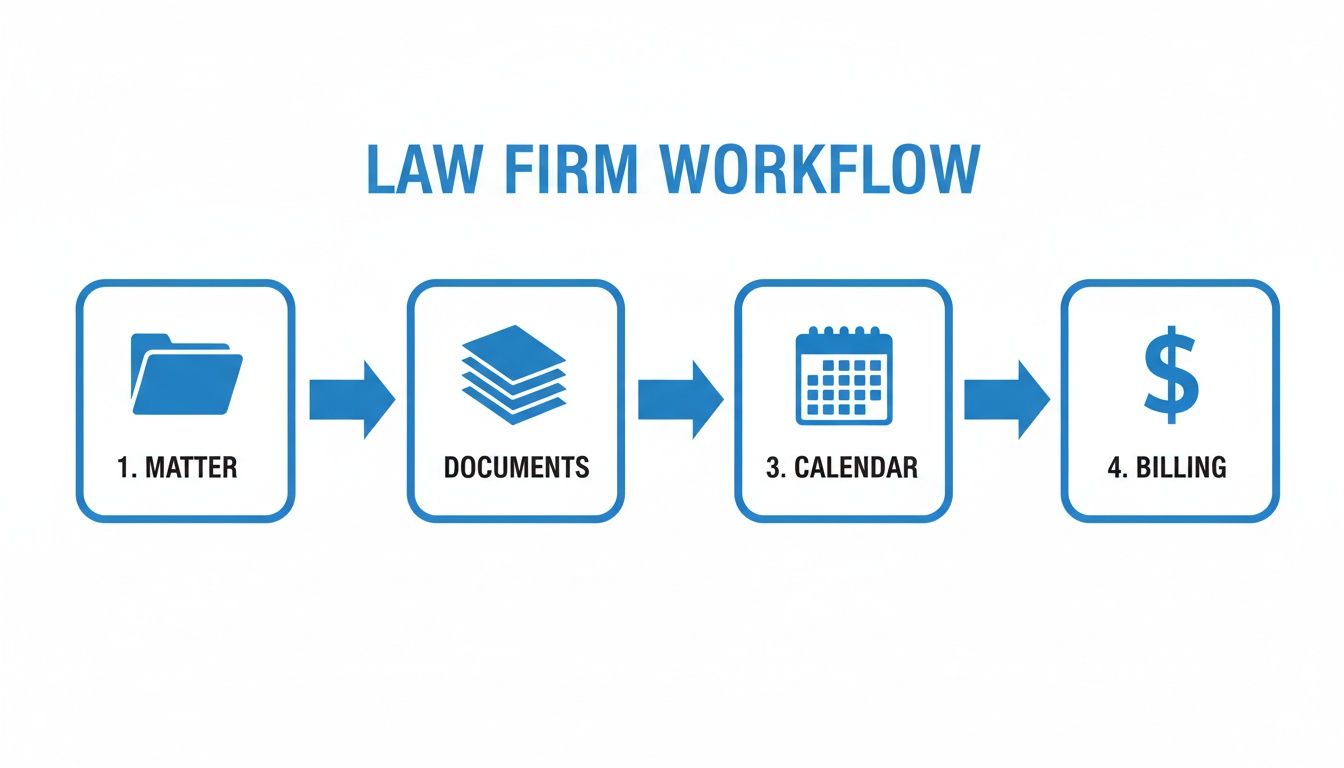
The key is that the quality of your entire case lifecycle depends on that first "Matter" step.
By using dedicated client intake software for law firms, you automate data collection, signatures, and payments, ensuring every matter begins with a solid foundation. A streamlined intake makes everything else in your case management system work better.
Choosing Your Case Management Approach
Not all case management software is built for small firms. What works for a 100-person litigation firm will bury a solo practitioner in features they’ll never use and costs they can’t justify. Your goal isn't to buy the most powerful system; it's to get the right leverage from the features you actually need.
You have two main paths: the all-in-one platform or a "best-of-breed" stack where you connect specialized tools. Each has its place, depending on your firm's goals and budget. Getting this choice right is the difference between a smart investment and another monthly subscription you regret.
All-in-One vs. Best-of-Breed Systems
An all-in-one system aims to be the single source of truth for your entire practice. Everything from intake and document management to billing and reporting lives under one roof. The big selling point is simplicity.
The best-of-breed approach is about picking the best tool for each specific job. You might use one service for documents, another for e-signatures, and a third for billing. This route offers flexibility but usually requires more technical setup.
The core decision is this: Do you value the simplicity of a single, unified system more than the flexibility of hand-picked tools? For most small firms, the all-in-one approach wins by reducing complexity and administrative headaches.
If you're leaning toward an all-in-one, our guide comparing Clio vs MyCase is a great next step, breaking down two of the most popular platforms.
All-in-One vs. Best-of-Breed Quick Comparison
| Factor | All-in-One Platform | Best-of-Breed (Integrated Tools) |
|---|---|---|
| Simplicity | High. One login, one interface, one bill. Easier to train staff. | Low. Requires managing multiple tools, logins, and subscriptions. |
| Integration | Built-in. Features are designed to work together seamlessly. | Requires setup. Relies on APIs or third-party tools, which can get complex. |
| Cost | Often more predictable with bundled pricing. You know what you're paying each month. | Can be cheaper at first but may grow more expensive as you add more tools. |
| Functionality | Can be a "jack of all trades, master of none." Some features might feel basic. | Superior. You get the absolute best tool for each specific function. |
| Onboarding | Generally much faster since you're only learning and setting up one system. | Slower. You have to learn, configure, and integrate multiple different products. |
For most small firms, the streamlined nature of an all-in-one system provides more immediate value by cutting down on time spent managing software.
Non-Negotiable Features for Your Small Firm
Whichever path you take, a few features are non-negotiable. If a system doesn't have these, it won’t provide real value.
- Cloud-Based Access: Your office is wherever you are. You need to pull up case files securely from your laptop or phone, no excuses.
- Bank-Grade Security: Client confidentiality is your highest obligation. The software must use robust encryption and security protocols to protect sensitive data.
- Intuitive Interface: If the software is clunky, you and your team won't use it. A clean, easy-to-navigate interface is crucial for adoption.
- Seamless Integrations: Your case management tool has to play nicely with software you already depend on, like your email, calendar, and payment processors like Stripe.
The legal tech market is buzzing with options. Small firms, being early adopters of digital tools in North America, now have more choices than ever. To get a broader sense of these trends, you can explore the findings on legal tech adoption.
How to Implement a New System Without Disrupting Your Firm
You see the value in a case management system, but the thought of implementation chaos is giving you a headache. Good news: you don’t have to grind your firm to a halt.
A smart, phased rollout makes the transition manageable. More importantly, it shows your team some early wins that build momentum. The secret is to focus on changing your process, not just installing software.

Plan a Phased and Focused Rollout
Instead of a firm-wide tech overhaul, break the implementation into small chunks. This minimizes daily disruption and lets your team master one new workflow before tackling the next.
- Get Your Team On Board: Start with the "why." Show them how it solves their biggest daily frustrations, like digging for documents or manually building invoices. Frame it as a system that frees them up for more valuable work.
- Be Smart About Data Migration: Don't try to import a decade of closed cases on day one. Focus only on migrating your active cases. This makes the initial transfer much faster and ensures your team has what they need right away.
- Master One Core Workflow First: Pick a single, high-impact process, like creating a new matter. Train everyone on just that one task until it becomes second nature.
The goal is to get a clear, undeniable win within the first week. When your paralegal can open a new client file in five minutes instead of thirty, they'll instantly see the value.
Make Training Practical and Ongoing
Training can't be a single, two-hour meeting. It has to be practical, hands-on, and reinforced over time.
Focus every training session on completing a specific, real-world task—not just touring features. Hold one session on generating a bill. Do another on assigning and tracking tasks. This task-based approach makes the learning tangible and immediately useful.
By rolling out the system piece by piece, you're not just implementing software; you're upgrading your firm's engine. This is the core of building effective law firm operations systems that scale with your practice.
Quick Answers to Your Case Management Questions
You’re busy. Here are straight, no-nonsense answers to the questions we hear most from small law firm owners.
How Much Is This Going to Cost Me?
For a small firm, expect to pay between $39 and $99 per user, per month. Lower-end plans usually handle the core essentials like organizing matters and calendars.
Higher tiers add advanced features like integrated billing, credit card processing, and automation. Just watch for hidden costs for data migration or training. Look for transparent pricing and don't sign a long-term contract until you're positive it's the right fit.
Is My Client Data Actually Secure in the Cloud?
Yes, as long as you pick a reputable provider. Modern, cloud-based legal software uses bank-level security to protect your firm’s most critical information.
Here’s what to look for:
- Data Encryption: This scrambles your data so it's unreadable, both when it's sitting on a server (at rest) and when it's moving across the internet (in transit).
- Two-Factor Authentication (2FA): This is non-negotiable. It adds a second security layer to your login, stopping unauthorized access even with a stolen password.
- Regular Security Audits: The best companies pay outside experts to try to break into their systems to find weak spots.
A good cloud system is almost always safer than keeping files on a server in your office closet, which is vulnerable to theft, hardware failure, or a burst pipe.
What's the Difference Between Case and Practice Management Software?
People use these terms interchangeably, but there's a real difference.
Case Management Software is about the client's file. It organizes the data, documents, and deadlines for a specific matter. It helps you do the work for the client more efficiently.
Practice Management Software is about the business itself. It does everything case management does, but adds tools to run the firm—like trust accounting, payroll, and business reporting.
For a small firm, the line is blurry, and many platforms do both. The key is to figure out where your biggest headaches are. If your chaos is from disorganized client files, a solid case management system is your answer. If your problems are bigger, like managing firm finances, you'll want broader practice management tools.
Ready to fix the most broken part of your workflow—turning a new lead into a signed, paying client? intake.link consolidates your entire intake process into a single link, letting you get signatures and payments before a potential client has time to call another firm.
Stop losing leads—get signatures before they call another firm