

Are you spending more time chasing down files and manually entering data than practicing law? For a small firm owner, that administrative chaos doesn't just waste time—it costs you clients and revenue.
The right practice management system fixes this, and for many, that system is Clio for lawyers. It’s designed to consolidate your scattered tools, automate tedious work, and give you back control over your firm's operations.
What Is Clio and Why Should Your Firm Care?
Think of Clio as the central operating system for your law firm. It’s a single platform designed to manage your cases, track your time, handle billing, and organize your documents, replacing the patchwork of spreadsheets and apps you're likely using now.
Its real job is to help you reclaim the staggering 48% of your time that attorneys lose to non-billable admin tasks. This isn't just about getting organized; it's about building efficient backend systems that let your small team do the work of a much larger one. That's how you scale without adding massive overhead.

Why Clio's History Matters to You
Clio launched in 2008 as one of the first cloud-based platforms for law firms and has since become the standard for small to midsize practices. By 2025, the company reported over $300 million in annual recurring revenue and achieved a valuation of around $3 billion.
That stability matters. It means you’re investing in a proven, reliable platform with the resources to keep innovating, not a startup that might disappear next year.
The goal is to move from a "system of record"—a simple digital filing cabinet—to a "system of action" that proactively helps you manage tasks, deadlines, and client communication.
The Bottom Line for Your Practice
So, what does this actually change in your day-to-day? Instead of jumping between a dozen disconnected tools, Clio brings your firm's critical functions into one unified dashboard.
- Matter Management: Every client file, document, contact, and deadline is organized in one central hub.
- Billing and Invoicing: Capture more billable time with built-in timers and generate professional invoices in minutes, not hours.
- Client Intake and Communication: Clio connects with specialized client intake software for law firms, creating a smooth journey from first contact to signed retainer. To make that first impression count, check out our complete guide to law firm client intake.
Using Clio is about buying back your time. It’s the difference between being a lawyer bogged down by admin work and a business owner with the right systems in place to grow.
A Deep Dive into Clio's Core Features
Let's cut through the marketing jargon. What tools inside Clio will you actually use every day? When we talk about Clio for lawyers, it boils down to four core pillars that directly replace the chaotic mix of spreadsheets and calendar reminders slowing you down.
These are practical solutions designed to bring order to your firm's operations.

This centralized approach is how you run a leaner, more profitable practice.
Matter Management: Your Digital Command Center
Imagine a perfect digital client file. That’s Clio's matter management. Every piece of information—contacts, documents, emails, deadlines, and billable hours—lives in a single, easy-to-access dashboard for each case.
No more digging through shared drives for an update. You can answer a client’s question or check a case status in seconds, whether you're at your desk or on your phone. For a small firm, this feature alone can replace a clunky server and a half-dozen cloud storage accounts.
Calendaring and Deadline Management
Missed deadlines are malpractice risks. Clio’s calendaring tools are built to eliminate that danger. This is more than just an appointment book; it includes court-specific rule sets that automatically calculate litigation deadlines based on the rules of civil procedure.
For any firm with a litigation practice, this is a game-changer. Instead of manually counting days and triple-checking rules, the system does it for you, adding a critical layer of protection against human error.
Billing and Invoicing That Actually Works
How much billable time slips through the cracks each week? Five minutes here, ten minutes there—it adds up to thousands in lost revenue. Clio helps you capture it with built-in timers you can start, stop, and assign to a matter with one click.
When it’s time to bill, you can generate detailed, professional invoices in minutes. The system automatically pulls in all logged time and expenses, ending the tedious, error-prone process of building invoices from scratch. This doesn't just save time; it gets you paid faster.
While Clio Manage handles billing well, it’s a practice management tool, not a dedicated CRM for a law firm. Understanding that difference is key to building a complete client lifecycle system.
Secure Document Management
Your firm runs on documents, and keeping them organized and secure is an ethical obligation. Clio provides a secure, cloud-based home for every document with features built for legal work:
- Version Control: Ensure you're always looking at the latest draft.
- Template Creation: Build your standard motions and agreements to save time and ensure consistency.
- Secure Client Portal: Ditch insecure email attachments and share sensitive documents with total confidence.
This centralizes your firm’s most valuable asset—its work product—making it secure, backed up, and accessible from anywhere.
Supercharge Clio with the Right Integrations
Clio is powerful on its own, but its true value is unlocked when you connect it to other specialized tools. An integrated system gives your small firm the operational leverage to compete with much larger practices by automating the entire client journey.
This happens when your essential tools—for intake, signatures, and payments—talk to each other seamlessly. You can turn Clio from a simple filing system into a client conversion engine, closing the gaps where 67% of clients are lost because a firm didn't respond quickly enough.
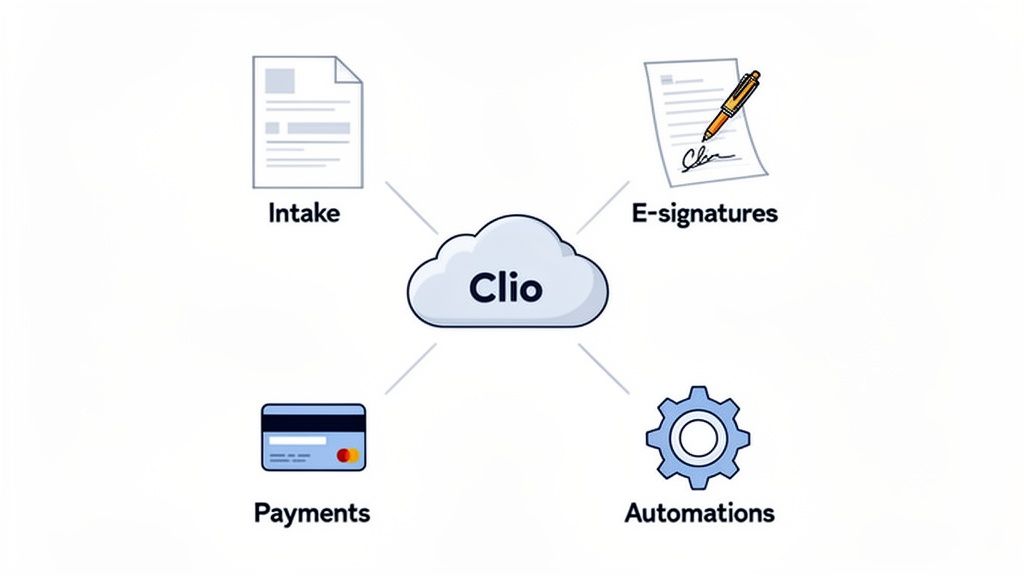
A connected system puts Clio at the hub while automating the flow of information from your other critical business tools.
Building Your Core Legal Tech Stack
You don't need dozens of integrations. For a small firm, focusing on just three categories delivers the biggest and fastest return on investment.
- Intake & CRM: This is your digital front door. While Clio Grow is a basic CRM, a specialized tool like intake.link is built to convert leads faster by combining intake forms, e-signatures, and payment into a single, frictionless step.
- E-signatures: Tools like DocuSign are non-negotiable. Making a client print, sign, and scan a retainer agreement is a great way to lose them to a faster competitor.
- Payments: Integrating a processor like LawPay or Stripe lets you collect consultation fees or retainers upfront, improving cash flow and securing the client relationship instantly.
From Manual Chaos to Automated Workflow
Let's be practical. Without integrations, your intake is a painful back-and-forth of emails. You send a PDF, wait for its return, then manually type that data into Clio. You send a separate retainer, chase a signature, then send an invoice and hope for payment. Each step is a point of friction where the client can drop off.
An integrated workflow collapses this into one motion. A new lead fills out a form, signs the retainer, and pays the deposit in a single session. All that data, the signed document, and the payment confirmation automatically sync to the correct matter in Clio. No chasing, no manual entry.
This isn't about saving a few minutes. It's about closing the gap between a client's decision to hire you and the moment they actually do.
Clio Integrations vs. Manual Work
| Task | Manual Workflow (Disconnected Tools) | Integrated Workflow (Clio + intake.link) |
|---|---|---|
| New Lead Intake | Staff manually types lead info from an email into Clio. | Lead data from your intake form automatically creates a new contact and matter in Clio. |
| Sending Retainer | Staff manually drafts a retainer, attaches it to an email, and sends it. | A pre-filled retainer is automatically sent for e-signature as part of the intake flow. |
| Collecting Signatures | Wait for client to print, sign, scan, and email back. Follow up multiple times. | Client signs on their phone in seconds. The signed document is automatically saved to the Clio matter. |
| Collecting Payment | Send a separate invoice and hope for a check or wire transfer. | Client pays the retainer by credit card on the same form where they signed. Payment syncs to Clio. |
| Data Accuracy | High risk of typos and errors from double data entry. | Data is captured once and flows seamlessly, ensuring 100% accuracy. |
As you can see, integrations don't just save time—they eliminate the weak points where you lose clients and revenue.
Connect Your Financial and Practice Data
Beyond client intake, connecting Clio to your accounting software like QuickBooks is a critical operational move. This integration automates the flow of invoices, payments, and expenses, eliminating double data entry and giving you a clear, real-time view of your firm's financial health. For more on this, explore the benefits of a CRM and QuickBooks integration.
How AI Is Changing the Game for Clio Lawyers
What does AI actually mean for your daily work? Inside Clio, it’s becoming a practical tool that gives small firms a serious competitive edge. It’s not about replacing your legal judgment; it's about amplifying it by handling the tedious work for you.
Think of it this way: traditional software records what you’ve already done. An AI-powered system helps you decide what to do next. It can summarize a long client email into three bullet points or draft a response to a discovery request, freeing you up to focus on high-level strategy. This is where using Clio for lawyers with AI provides a real advantage.
From Document Analysis to Firm Profitability
Clio’s AI feature, Clio Duo, acts like a built-in assistant that understands the context of your legal work. It can help draft documents, summarize case files, or kickstart legal research. You're not just asking a generic chatbot a question; you're giving your practice management software the ability to reason about the information it already holds.
This shift is a clear driver of firm growth. The data shows a direct line between tech adoption and revenue.
The 2025 Clio Legal Trends Report reveals that 79% of legal professionals now use AI, and growing firms use it twice as much as shrinking ones. The result? Their revenue has nearly doubled since 2020 with only 50% client growth and no significant increase in staff. You can read more about the latest AI adoption trends in the legal sector here.
This data makes it clear: AI is a strategic investment in efficiency that directly impacts your bottom line.
Practical AI Uses for Your Small Firm
So, what does this look like day-to-day? Here are a few concrete examples:
- Automated Summaries: Instantly get the key points from a long deposition transcript or a dense client email chain.
- Intelligent Document Drafting: Generate a first draft of a standard motion or client letter based on your templates and matter-specific details.
- Proactive Task Management: Let the AI suggest the next logical step in a case or create tasks for your team based on a new court filing.
By embracing these tools, you're building a firm that can handle a larger caseload with the same team. It's about creating operational leverage to compete with bigger practices without the overhead.
Your Plan for Migrating to Clio
The thought of moving your entire practice to new software is daunting. But migrating to Clio is a manageable project when you break it down into four clear phases. A smooth transition is all about having a smart plan.
Follow this four-step roadmap to get your firm running on Clio without sacrificing billable hours.
Phase 1: Planning and Data Cleanup
Before you move a single file, you have to decide what’s coming with you. This is the perfect time for a digital spring cleaning. Archive old, closed matters, merge duplicate contacts, and decide which data is essential. A clean dataset makes the migration faster and far less complicated.
Phase 2: The Data Migration
Once you know what you’re moving, it’s time for the transfer. You're not on your own here. Clio has a dedicated team that handles migrations from most other legal software and can even work with organized spreadsheets. They run a test migration first to ensure everything maps correctly before doing the final move, minimizing downtime and data errors.
The legal tech market is set to grow from $29.81 billion in 2025 to $32.53 billion in 2026, and this kind of supported onboarding is a key reason why. You can get more insight into Clio's strategic vision and recent acquisitions here.
Phase 3: Team Training and Adoption
A new tool is useless if your team doesn't use it. Schedule dedicated training focused on the core features they'll use daily: creating matters, tracking time, and sending bills. Don't try to teach everything at once.
Start with the basics. Mastery of a few key workflows is far more valuable than a superficial understanding of every feature. Encourage your team to create their first task on day one to build immediate confidence.
Phase 4: Setting Up Key Integrations
The final step is connecting Clio to the other software that runs your firm. Zero in on the integrations that give you the biggest, most immediate impact on your client acquisition and intake process.

This chart shows how clean data at the start leads to smarter analysis and a more profitable firm. When you connect a tool like intake.link, new client data, signed retainers, and payments flow directly into Clio, eliminating manual entry and creating a seamless client journey from the very start.
Common Questions About Clio for Lawyers
You have practical questions. You deserve straight answers. Here’s a no-fluff breakdown of the most common concerns we hear from small firm owners considering Clio.
Is Clio overkill for a solo or 2-attorney firm?
Not at all. Small firms often get the most value from Clio because you don't have a dedicated admin team. You're likely already paying for separate tools for billing, cloud storage, and calendaring. Clio rolls all of that into one subscription, often at a lower total cost.
It puts the non-billable tasks on autopilot, freeing you up to practice law. Master the core features you need now, and the platform will be ready to grow with you.
How hard is it to get my existing client data into Clio?
This is a major source of anxiety, but you won’t have to figure it out alone. Clio has a dedicated team that does nothing but handle data migrations from other legal software and even from organized spreadsheets.
The process is structured and supported:
- Consultation: They review your current data and map it to Clio’s system.
- Test Migration: You review a sample to make sure everything looks right.
- Final Migration: This is scheduled to minimize disruption to your firm.
While it requires some planning, it’s a well-supported process designed to prevent the nightmare data-loss scenario you might be picturing.
What's the difference between Clio Grow and Clio Manage?
This is a critical distinction. They handle two different parts of the client journey and are designed to work together as the full Clio Suite.
- Clio Grow is your client relationship management (CRM) tool. It handles everything before someone hires you—tracking leads, managing your sales pipeline, and automating intake.
- Clio Manage is your practice management software for everything after they've retained you. This is where you run the actual case, track your time, send bills, and manage documents.
Can I use Clio if I'm not very tech-savvy?
Yes. One of Clio’s biggest strengths is its user-friendly design. While the platform is powerful, the day-to-day functions are straightforward. You don't need to be a tech expert to get immense value from it.
The key is to avoid getting overwhelmed. Don't try to learn everything at once. Pick your biggest administrative headache—like time tracking or invoicing—and master that first. Once it feels natural, move on to the next feature.
Clio also provides extensive support, from live webinars to a huge help center and real human support you can call. The goal isn't to become a power user overnight; it's to consistently use the features that save you the most time.
At intake.link, we believe the moment a client decides to hire you and the moment they actually retain you should be seconds apart, not days. We built our platform to bridge that critical gap.
See how intake.link consolidates your entire intake process