

You’re drowning in admin work, and it’s costing you clients. For every hour you spend chasing signatures or manually entering data, a potential client is calling another firm that responds faster.
Law firm automation software is how you stop the chaos. It’s a digital assistant that handles the repetitive, non-billable work, letting you focus on practicing law and signing clients before they go cold.
Stop Drowning in Admin Work and Start Automating Your Firm
If you feel like you're constantly buried in administrative tasks, you're not imagining things. Attorneys spend a staggering 48% of their time on non-billable admin work. For a small firm owner, that’s nearly half your week gone with zero revenue to show for it.
That lost time is a direct hit to your bottom line. Every minute spent creating a contact, drafting a boilerplate engagement letter, or chasing an invoice is a minute you aren't spending on case strategy. To scale your firm, you must leverage systems that let your small team do the work of a much larger one. This is the core of smart law firm operations.
How Automation Flips the Script
So, how does this work in practice? Automation connects the fragmented steps of your client intake into one seamless workflow. It fundamentally shifts your firm from reactive to proactive.
Instead of your team chasing the client for a signature, the system automatically guides them from their first inquiry to a signed retainer agreement—often in minutes.
The goal isn’t to replace your personal touch. It’s to handle the repetitive tasks so you can dedicate more time to the high-value interactions that build client trust and win cases.
This guide is your roadmap to scaling your firm without hiring more staff to handle paperwork. We'll break down how these systems work to make your practice more profitable and far less stressful. You can also dive deeper into how to automate your client intake workflow in our detailed article.
How Law Firm Automation Software Actually Works
Let's cut through the jargon. "Law firm automation software" isn't some massive, complicated program that requires weeks of training. Think of it as a digital command center that puts all the repetitive, non-billable steps of your client journey on autopilot.
Consider what happens when a new lead fills out your website form. The old way is a manual scramble: create a new contact, draft an engagement letter, email it, and wait. Once it's signed, you send an invoice, wait for payment, and finally update the case file. It’s a slow, disconnected process where good leads go cold.
From Manual Chaos to a Single Link
Automation transforms that chaos into a single, elegant workflow. When that same lead hits "submit," the system instantly kicks off a sequence you’ve already defined.
It automatically populates an engagement letter, sends it for a secure e-signature, and then prompts for the retainer payment—all in one smooth experience. Once they sign and pay, all that information syncs directly into your practice management system.
This isn't about replacing people; it's about giving your small firm the operational horsepower of a much larger one. You eliminate tedious data entry, slash human error, and become responsive 24/7 without actually being at your desk.
This flowchart shows the classic manual workflow that good automation software is designed to replace.
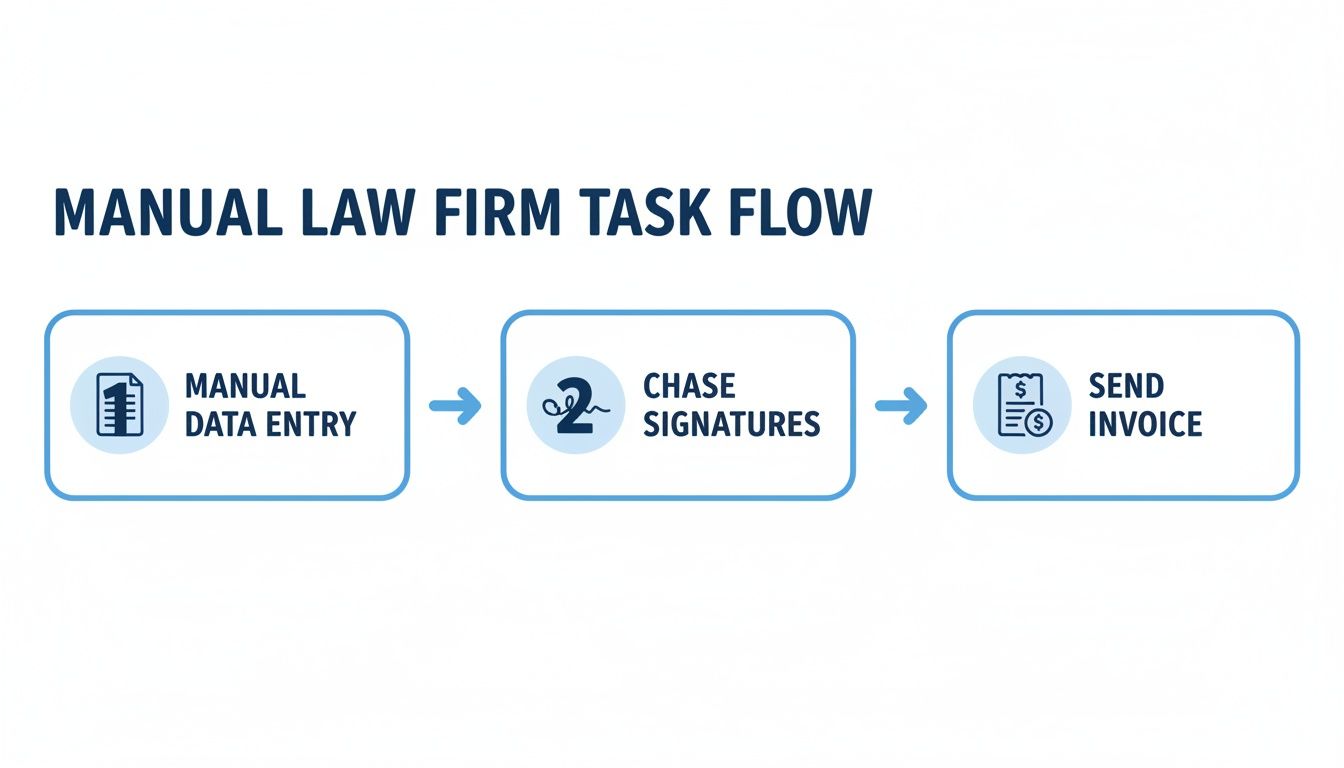
Every step in that manual process is a delay—a point of friction where a potential client loses interest and calls the next firm on their list.
The Core Engine: Trigger-Based Workflows
The magic behind these tools is a simple concept: trigger-based workflows. This just means one action—like a client submitting a form—automatically sets the next step in motion.
Here’s a practical example:
- Trigger: A potential client fills out your intake form.
- Action 1: The software instantly creates a contact in your CRM. Check out our guide on the best legal CRM software to learn more.
- Action 2: It simultaneously generates a personalized retainer agreement.
- Action 3: An email and text message go out to the client with a secure link to sign and pay.
- Action 4: Once paid, the system automatically marks their invoice as paid and updates their status to "Retained."
This isn’t a niche trend; it's how efficient firms now operate. Recent data shows 62% of firms use automation for key processes. Many are deploying AI for tasks like contract review—a figure that has jumped a staggering 27% since 2021.
Core Automation Features Your Law Firm Needs
Not all automation software is created equal. You aren’t looking to add another complicated tool; you’re looking to consolidate and simplify. The best law firm automation software is a unified system built to solve your biggest operational headaches, from intake to payment.
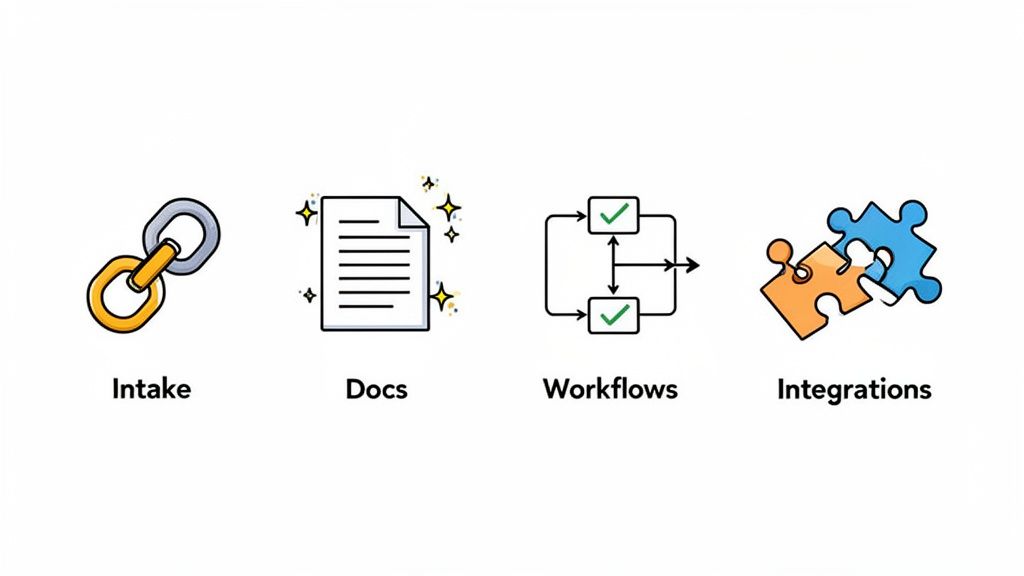
Let’s get practical. These are the non-negotiable features that deliver the fastest return on investment, turning administrative drag into a competitive advantage.
Unified Client Intake and Onboarding
Everything starts here. A unified intake means a potential client can go from curious lead to retained client in one unbroken flow. Instead of chasing them with three separate emails, you send one smart link that does it all.
This single link guides them through:
- Filling out the initial intake form with case details.
- Reviewing and signing the engagement letter electronically on any device.
- Paying the retainer or consultation fee securely online.
This approach closes the gaps where leads usually go cold. It makes hiring your firm feel fast, modern, and effortless—exactly the first impression you want to make.
Automated Document Generation and E-Signatures
How many hours does your team sink into drafting the same routine documents? With automation, you build templates for engagement letters and fee agreements just once. The software then pulls data directly from the intake form to populate them instantly.
No more copy-paste errors. No more wasted time. The document is generated and sent for a legally binding e-signature in minutes. This isn't just about speed; it's about accuracy and compliance, as modern platforms have the legal requirements for electronic signatures built right in.
Think of it this way: you build a client-ready engagement letter once, then deploy it hundreds of times with zero manual effort. That’s powerful leverage for a small firm.
No-Code Workflow Automation
If intake and documents are the components, workflow automation is the engine. This is where you build step-by-step processes for any repetitive task at your firm—all without writing a single line of code.
You create simple "if this, then that" rules that run your processes on autopilot.
Example Client Onboarding Workflow:
- Trigger: A client completes the intake process (signs and pays).
- Action 1: Their status automatically updates to "Retained" in your practice management software.
- Action 2: A welcome email is automatically sent with information about next steps.
- Action 3: An internal notification pings your paralegal to open the case file.
These workflows are your firm's safety net, ensuring nothing falls through the cracks.
Critical Third-Party Integrations
Your automation software can't be an island. It has to talk to the other tools you rely on every day. Seamless integrations stop you from manually shuttling data between systems.
Key integrations for any small law firm include:
- Practice Management Software: Direct connections to tools like Clio or MyCase are non-negotiable.
- Payment Processors: Integration with platforms like Stripe or LawPay is essential for collecting retainers.
- Calendars and Email: Connecting to Google Calendar or Outlook allows for automated appointment scheduling and follow-ups.
- Connectors: Tools like Zapier or Make let you build custom automations with thousands of other apps.
The following table highlights how these core features create tangible value for your practice.
Essential Automation Features for Small Law Firms
| Feature | Primary Benefit | Example Use Case |
|---|---|---|
| Unified Intake | Higher Conversion Rates | A potential client completes a form, signs the retainer, and pays the deposit in one seamless 5-minute flow. |
| Document Automation | Massive Time Savings | An engagement letter is automatically generated and sent for signature the moment a lead is qualified. |
| No-Code Workflows | Process Consistency | A "New Client" workflow automatically creates a matter in Clio and tasks a paralegal to prepare the file. |
| Payment Integration | Improved Cash Flow | A client pays their retainer via credit card at 10 PM on a Friday, securing their spot without staff help. |
| Practice Management Sync | Reduced Admin Work | All client contact info, signed documents, and notes from intake appear in the correct matter file instantly. |
A well-chosen automation platform isn't just another piece of software. It's an operational backbone that lets a small firm punch well above its weight.
How to Choose the Right Law Firm Automation Software
Picking the right law firm automation software doesn't have to be a grind. Forget complex spreadsheets. You just need a practical framework that zeroes in on your firm's actual problems.
The goal is to find a tool that fixes your biggest headache today and can grow with you tomorrow.
Start With Your Biggest Pain Point
Before you watch a single demo, pinpoint the most chaotic part of your day. Is it messy client intake? The slow back-and-forth on documents? The endless chase for retainer payments? The right software solves a specific, nagging problem.
Don't buy a tool because it can do a hundred things. Buy it because it excels at the one thing that will give you the most time back, right now.
Your first piece of automation software should deliver an immediate, tangible win. Solve your biggest operational headache first, and the ROI becomes undeniable.
Prioritize a Unified Platform Over Scattered Tools
The last thing your firm needs is another password to remember. A classic mistake is patching together separate tools for intake forms, e-signatures, and payments. This just creates more manual work connecting the dots.
Look for a unified platform that handles multiple steps in a single workflow. A system that combines the intake form, document signing, and payment processing into one link dramatically cuts the odds of a lead dropping off. This is key to truly streamlining your law firm operations.
Evaluate Ease of Use and Implementation
Here’s a simple test: if you can't get the software set up and run a test client through it in under an hour, it's too complicated. The best modern tools are designed for lawyers, not IT consultants. Look for intuitive, no-code interfaces with simple drag-and-drop editors.
The legal tech market is white-hot, with firms racing to get more efficient. Technology spending in the legal market jumped by 9.7% year-over-year. This reflects a major shift as firms adopt tools to get a competitive edge. You can read more about these legal market trends.
Scrutinize Critical Integrations
Your automation software must play nicely with your existing tools. A smooth integration with your practice management software (like Clio) isn't a "nice-to-have"—it's non-negotiable.
This connection ensures all new client data, documents, and payments automatically populate in the right matter file. No manual data entry. Also, check for integrations with your payment processor (Stripe) and calendar to ensure the entire client journey is connected. If you're comparing options, see how the best document automation software for law firms stack up on integrations.
Your Step-by-Step Implementation Plan
You’ve picked your software—now put it to work. A successful rollout is a deliberate process. You start small, lock in quick wins, and build momentum.
This roadmap will guide you through a smooth transition. The goal is to see the value of your new law firm automation software from day one.
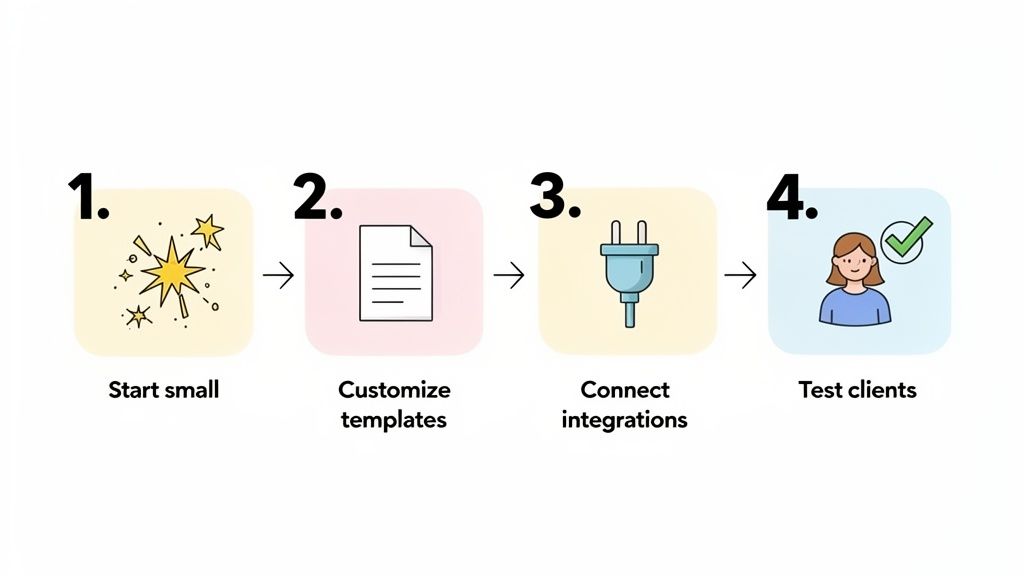
Phase 1: Automate One Core Process
Start with a single, high-impact process. Don't try to boil the ocean. For most small firms, that's the client intake and retainer process. This is your biggest opportunity to make a great first impression and get paid faster.
Here's how to tackle it:
- Map Your Current Process: Sketch out every step, from first contact to retainer paid. Circle the delays and manual tasks.
- Build the Automated Flow: Recreate that process in your new software. Define the trigger (form submission) and the next actions (send engagement letter).
- Focus on Speed-to-Sign: Your goal is to shrink the time it takes to get a client retained. Remember, leads contacted within 5 minutes are 21x more likely to convert. Your new workflow should make that speed the new normal.
Once this core process is humming, you’ll have the confidence to automate other parts of your practice.
Phase 2: Customize Templates and Branding
Automation should make your firm feel more professional, not robotic. Your clients should feel like they're interacting with your firm, not generic software.
Upload your logo, set your brand colors, and tweak the language in your automated emails to match your firm’s unique voice. A polished, branded experience shows clients you sweat the details.
An automated system that looks and feels like your firm reinforces your professionalism. It tells a new client you are organized, modern, and ready to handle their matter with care.
Phase 3: Connect Your Key Integrations
Your new tool becomes a powerhouse when it talks to your other systems. Connecting key integrations is what kills double data entry.
Focus on these essential connections first:
- Practice Management Software: Link to your main system, like Clio. This ensures new matters are created instantly with all intake data.
- Payment Processor: Connect to your Stripe or LawPay account. This is non-negotiable for collecting retainers within the intake flow.
- Calendar and Email: Sync with your calendar to automate consultation scheduling and manage communications.
Phase 4: Run Tests and Go Live
Before you unleash this on actual clients, kick the tires. Create a few fake client profiles and run them through the entire process. Fill out the form, sign the test document, and make a test payment.
This is your chance to catch awkward phrasing or confusing steps. Have a paralegal or friend go through it to get fresh eyes on the client experience. Once you've ironed out the kinks, you're ready. Send the link to your next new lead and watch the system work.
Measuring the ROI of Your Automation Software
How do you know if your investment in law firm automation software is paying off? The real return on investment (ROI) is about tracking specific metrics that directly impact your bottom line.
When you can prove automation is a profit center, it changes how you run your firm. The global Legal Tech Market is already valued at USD 24.11 billion and is projected to explode to USD 96.58 billion by 2035. This isn't a fad; it's a massive industry-wide bet on efficiency. You can discover more insights on legal tech growth.
Time Saved on Non-Billable Work
This is the easiest number to grab. Estimate how many hours your staff burns each week on admin tasks like data entry and chasing signatures.
Once automation is running, do the math again. If you reclaim just five non-billable hours a week, and you value that time at a conservative $50/hour, that’s $1,000 per month back in your pocket.
Lead-to-Client Conversion Rate
Out of all qualified leads, how many actually sign? Automation has a huge impact here by crushing the delays that kill deals. When a potential client can review, sign, and pay in one five-minute session, your conversion rate skyrockets.
(New Clients / Qualified Leads) x 100 = Conversion Rate
If you used to convert 10 out of 50 leads (20%), and now you convert 15 (30%), that’s a 50% increase in new business from the exact same marketing spend. That's a powerful return for any firm looking to stop losing leads and achieve faster conversions.
Average Time-to-Retainer
How many days pass between a prospect’s first call and the moment they officially pay? For too many firms, this is a painful saga of phone tag and email chains.
With a unified automation system, that timeline shrinks from days to under 10 minutes. A faster time-to-retainer improves cash flow and delivers a knockout first impression.
Reduction in Costly Errors
Manual data entry is a minefield of mistakes. A typo in a name, an incorrect case number, a missed deadline—these create liability and demand hours of non-billable cleanup.
Automation ensures data is captured correctly once and synced perfectly across every system, from intake forms to your practice management software like Clio. It's about safeguarding your firm's accuracy and reputation.
Common Questions About Law Firm Automation
You've seen what's possible, but it's smart to have questions. Here are straight answers to what we hear most from small firm owners.
Isn't automation software too expensive for a solo attorney?
Not anymore. The best tools are built specifically for solos and small firms. The real question is about the cost of doing nothing.
If the software saves you just two non-billable hours a month, it has likely paid for itself. If it helps you land one extra client you would have lost to phone tag, it’s pure profit.
How hard is this to set up? I’m a lawyer, not an IT guy.
That's the point. The best automation platforms are designed for you. Look for a simple, no-code setup you can configure in under an hour.
Connecting tools you already use, like Clio for practice management or Stripe for payments, should take just a few clicks. The software is supposed to take work off your plate, not add technical headaches.
Will automation make my firm feel cold and impersonal?
The opposite is true. When done right, automation improves the client experience by making your firm feel more responsive and organized. It eliminates the frustrating delays that make clients feel forgotten.
Imagine a potential client finds you online. Within minutes, they can fill out a form, sign your retainer, and pay—all from their phone. That’s a powerful first impression that frees you up to provide actual legal advice.
Automation handles the transactional parts of the relationship so you can focus on the transformational. A smooth, modern onboarding process tells a client they made the right choice.
What's the difference between practice management and automation software?
They solve two different problems but work together perfectly. You need both.
- Practice Management Software (like Clio): This is your firm's central filing cabinet. It’s your system of record for managing case files, tracking time, and sending invoices for existing clients.
- Automation Software (like intake.link): This is the engine that drives your workflows, especially at the start of the client journey. It’s built to turn a new lead into a signed, paying client as quickly as possible.
The magic happens when they're connected. Your automation software captures the new client, gets the retainer signed, and collects payment. Then, it automatically pushes all that data into your practice management system to create a new matter—no manual work required.
Explore how unified workflows replace scattered tools. intake.link consolidates your entire process into one link, so you can get signatures and payment before potential clients have a chance to call another firm.
Stop losing leads—get signatures before they call another firm